Raw Data Processing
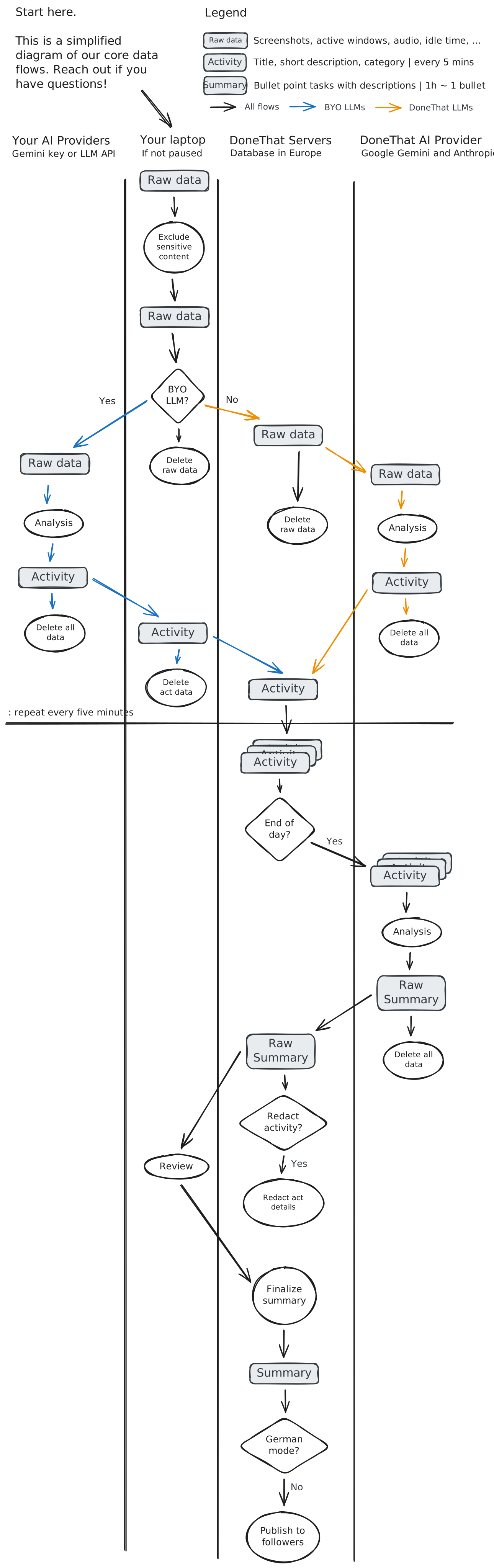
Screenshots and activity logs are captured locally when tracking is not paused. Raw inputs are processed in real time and discarded rather than stored. If you only want to capture browser activity, you can record with the Chrome extension instead.
Local data cleaning
The journey starts on your laptop. Before anything is sent for analysis, excluded apps are redacted as configured in app exclusions.
BYO LLMs
If you have access to your own LLMs, the app can send raw activity data and our default prompt to your Gemini or OpenAI-compatible model instead. Only the resulting structured activity data reaches our servers. See BYO LLMs and prompting.
Open source verification
You can verify the full BYO LLM flow in our open source desktop section above. The local capture layer is the part you should be able to inspect directly.
DoneThat LLMs
By default we use our AI providers to process raw data. They do not store it, do not use it for training, and run behind our privacy-focused prompting. The default pipeline is European. Provider details are listed in Subprocessors.
Activity Data Processing
Structured activity data is stored on our EU-hosted servers. That enables summary review, editing, sharing, and the rest of the product.
Raw summary generation
Every day, either when you click "Finish Day" or around midnight, we generate a raw summary from that day's activity data.
Each raw summary is made of bullet points representing tasks with a title, short description, and classification.
After generation of the bullet points, we optionally redact all activity descriptions if you chose to redact as configured in redactions.
Summary finalization
If you generate the summary with the "Finish Day" button, you can review all bullet points before finalizing.
Midnight summaries are automatically finalized, but you can still edit summaries later or delete both summary elements and activity data.
Summary sharing
Once finalized, summaries are visible only to the people you allow via visibility, such as followers or your team. You can also share only relative percentages rather than absolute time.








 Push to Slack