DoneThat LogoDoneThat

Your Data, Your Control

We architected DoneThat with privacy at it's core. DoneThat's simplicity hides the complexity of data handling. Here we explain in more detail how your data is handled.

Data Flows

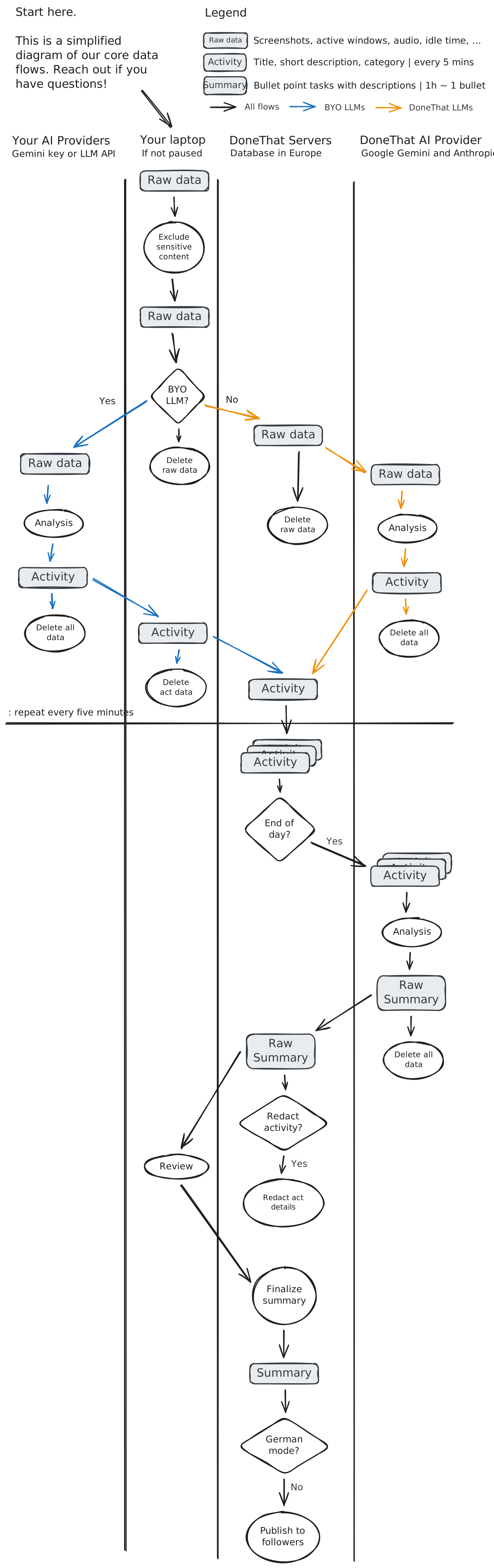
Let's start with the core of it: The data flows. This diagram shows the core journey of your data from your laptop to our servers and back.

Raw Data Processing

Screenshots and activity logs are captured locally on your device as long as it is not paused and immediately sent for AI processing. Raw data is never stored on our servers or our AI partners' servers. It's processed in real-time and discarded.

Local data cleaning

The journey starts on your laptop. Local data is collected here in regular intervals. When it comes to sending it off for analysis, we redact any apps you want excluded as described in app exclusions.

BYO LLMs

If you have access to your own LLMs, you can configure the app to use them for processing of raw data, see subsection BYO LLMs. In that case we send the raw activity data and our default prompt to your Gemini or OpenAI-compatible LLM, and only send the resulting activity data to our servers. Activity data consists of a title, a short description, and a classification of this time period. Our prompts are designed to ignore anything sensitive or private.

DoneThat LLMs

By default we use our AI providers to process your raw data. You can see the up-to-date list of AI providers in the Subprocessors section. Our AI providers never store any of your data and never use it for training. Neither do we. Our prompts are designed to ignore anything sensitive or private. We use a fully European processing pipeline by default.

Activity Data Processing

Activity data and further processed data is stored on our own EU-hosted servers and is processed by our vetted AI providers. This is to enable features like viewing and editing your data from anywhere, sharing summaries with followers, and protecting our prompt IP.

Raw summary generation

Every day either when you click "Finish Day" or around midnight we use all the activity data of the day to generate a raw summary.

Each raw summary consists of a few "Bullet Points", which each represent a task consisting of a title, description, and classification.

After generation of the bullet points, we optionally redact all activity descriptions if you chose to redact as configured in redactions.

Summary finalization

If you chose to generate the summary with the "Finish Day" button, you can review all bullet points before finalizing.

For summaries generated at midnight, summaries are automatically finalized, however it is always possible to edit summaries after finalization or delete both summary elements or activity data.

Summary sharing

Once finalized, the summary is visible to people you allowed to view your summary, for example your followers or your team, as configured in visibility.

If your organization enabled German Mode, the summary is only visible to you and will never be visible to anybody else.

DoneThat Data Flow Diagram

Pausing

Complete control over when tracking happens. Pause at any time to ensure sensitive work or personal time is never captured.

  • One-click pause: Stop tracking instantly from the menu bar or the tray
  • Scheduled pausing: Set work hours to automatically pause outside work time
  • Visual indicator: Always know when tracking is active or paused
Pausing Tracking

App Exclusions

Granular control over which applications are tracked. Excluded tools are "greyed out" in the screenshot before sending for procesisng. See screenshot for an example. If you toggle "ignore activity" this will ignore this time period if you did nothing else.

Common exclusions:

  • Password managers and authentication tools
  • Personal communication apps
  • Financial tools, spreadsheets with sensitive data
  • Meeting apps and video conferencing tools
Application Exclusion Settings

Bring Your Own LLMs

Want complete control over raw data processing? You can bring your own LLM for the initial sensitive parts of the processing pipeline

When you enable BYO AI, your raw activity data goes directly to your chosen provider—not through our AI partners. We support:

  • Gemini via your own API key (locally encrypted)
  • Any OpenAI compatible API (local or cloud-based, with locally encrypted key)
Bring Your Own AI Configuration

Prompting

We instruct our AI models to strictly ignore any sensitive or private content that might appear in your screenshots or activity logs.

We regularly audit results and update the prompts to keep high accuracy while protecting privacy.

AI Prompting Safety

European Processing

We offer fully European processing where all data (storage, compute, and LLMs) is processed in the EU, hosted on Google Cloud and Google Vertex AI.

This is the case by default. See our subprocessors for more details.

European Data Processing

Data Redactions

We already minimize data everywhere in our pipeline. You can go one step further by redacting all intermediary data after processing.

This comes at the risk of not being able to understand what tasks were based on or not making use of future features we might develop.

Data Minimization and Redaction

Editing

Full control over your summaries. Review, edit, or delete any entry at any time—before or after finalization.

  • Review before sharing: Use "Finish Day" to review summaries
  • Edit anytime: Modify titles - we use AI to make sure they stay close to the underlying data
  • Hide tasks: Hide tasks from summaries in case of sensitive work you do not want to share
  • Delete entries: Remove individual items or corresponding activity data
  • Manual additions: Add missing work such as offline meetings or activity while DoneThat was paused. These will be marked as manually added
Editing Summaries

Visibility

Control who can see your work summaries. DoneThat gives you complete flexibility over sharing your productivity data.

  • Private by default: Your data is only visible to you and people you accept as followers. Everybody starts here.
  • Share with team: Share with members of your immediate team
  • Allow org access: Allow your organization to see your summaries
  • Build in public: Build fully in public for visibility and accountability
Visibility Settings

German Mode

The "German Mode" is specifically designed for maximal privacy within an organization. It comes with some trade-offs for visibility and collaboration but ensures maximal protection of employee data.

  • Employee-only visibility: Data is visible only to the employee, with no access for managers or teams
  • No voluntary sharing: Even voluntary sharing to teams or followers is disabled
  • Default for German organisations: We enable this by default for any organization based in Germany
  • Optional for everybody else: Any other organization can enable this mode in their settings
German Mode Settings

Compliance & Regulations

DoneThat is designed to comply with privacy and data protection regulations worldwide.

Security

Enterprise-Grade Security Standards. While we are currently working towards formal ISO 27001 certification for the coming year, our infrastructure is already built on these industry best practices:

Infrastructure:

Hosted on ISO 27001-certified Google Cloud Platform servers in Europe.

Encryption:

All data is encrypted in transit (TLS 1.2+) and at rest (AES-256).

Authentication:

Secure OAuth-based authentication with Google.

API Security:

All API keys (including BYO LLM keys) are encrypted locally before transmission and storage.

Vetted Partners:

We strictly vet all AI subprocessors for security and privacy compliance.

AI Model & Accuracy

Models Used:

We utilize industry-leading Large Language Models (LLMs) via API (Gemini 2.5 flash, Gemini 2.5 flash lite as well as Anthropic Haiku 3.5 as a fallback). We do not train our own foundational models.

Input Data:

Screenshots and activity logs are captured locally and processed in real-time. Raw data is never stored, only derived insights are kept.

Accuracy:

We run continuous evals to ensure accuracy and regularly sense-check with users.

Known Limitation:

Multitasking during the five-minute timeframes can get lost, however sampling at this iteration should still give accurate info.

Verification:

Users review and finalize all AI-generated summaries. The system is non-deterministic, meaning results vary slightly for the same input.

Optimization:

We employ best practices in prompting and use strict output schemas to minimize variance and force predictable results.

GDPR & Data Privacy

Your Data, Your Control. We designed our architecture to minimize risk from day one.

Low-Risk Transfers:

We process raw data (screenshots) in real-time and immediately delete it. Because we don't store the sensitive raw inputs, the risk of international data transfer is drastically reduced.

Full Ownership:

You have the absolute right to access, edit, or delete your data at any time.

Clear Roles:

We clearly define our role as a "Processor" acting on your behalf, with standard EU protections in place.

EU AI Act

Responsible AI by Design. We take a "safety-first" approach to AI regulation.

Proactive Compliance:

Regardless of technical classification, we voluntarily follow high-risk standards for data governance and risk management to ensure maximum safety.

Human in the Loop:

AI never has the final say. Users always review and approve summaries, ensuring no automated decisions affect you without oversight.

Transparency:

We are 100% open about when and how AI is used to process your activity.

EuGH Time Tracking

Meeting the "Objective, Reliable, and Accessible" Standard.

Objective:

Our system captures work hours automatically, reducing human error and forgotten timesheets.

Reliable:

We combine automation with human review. You can manually add offline work or correct AI misclassifications, ensuring the record is always accurate.

Accessible:

Every employee has instant access to their own time records, fulfilling the court's requirement for transparency.

German Employee Standards

Employee-First Privacy. Built to respect the world's strictest worker protection laws.

"German Mode" Capability:

The tool can be configured so data is visible only to the employees, with no access, even voluntary, for managers or teams.

Works Council Ready:

We support the mandatory co-determination process. The tool cannot be rolled out for monitoring without Works Council agreement.

Ferngeheimnis Safe:

Our "App Exclusion" feature ensures private apps (like WhatsApp or Webmail) are never recorded, protecting your private communications.

Questions about your data?

We're here to help. Reach out to our team for any privacy, security, or compliance questions.